Statement to Sheets

You’re off by $12.50 and it’s 9pm.

Somewhere in 200 hand-typed rows is one transposed digit. Stop typing them. Pick the statement, get the rows, and get your evening back. It runs inside your own Google account, so the file is never uploaded anywhere.

Your first 3 statements are free. No card.

What the bank gives you

ACME BANK — STATEMENT
01/03 COFFEE ROASTERS 42 12.50 987.50
01/07 PAYROLL DEPOSIT 2,400.00 3,387.50
01/09 RENT PAYMENT (1,200.00) 2,187.50
01/15 CARD FEE 45.00 DR 2,142.50

What you get

DateDescriptionAmount
2026-01-03COFFEE ROASTERS(12.50)
2026-01-07PAYROLL DEPOSIT2,400.00
2026-01-09RENT PAYMENT(1,200.00)
2026-01-15CARD FEE(45.00)

The hour isn’t the problem. The digit is.

Retyping a statement takes an hour you resent. Getting one character wrong costs you the evening.

You can’t close the month. The reconciliation is off by some amount that means nothing, so it tells you nothing about where to look. You scroll the same 200 rows for the third time hunting a 5 you typed as a 6, and every row looks correct because you typed them all the same careful way.

A bookkeeper closing a client’s books. A landlord working out who actually paid. Anyone whose accountant said “just send it as a spreadsheet” about a document the bank will only ever hand over as a PDF.

It’s a job nobody chose and nobody checks, right up until the number doesn’t match.

The statement never leaves your Google account

That’s not a promise about how we handle your data. There’s no upload to handle.

The PDF is read using Google’s own text recognition, inside your account, on your own quota. There’s no server of ours in the path. The only thing this add-on ever sends us is your licence key, once, to check it is real. Not the statement, not a row, not a total.

That matters more here than almost anywhere. A bank statement is the most sensitive document most people own: account numbers, balances, and every place they spend money.

It shows you the rows before it writes them

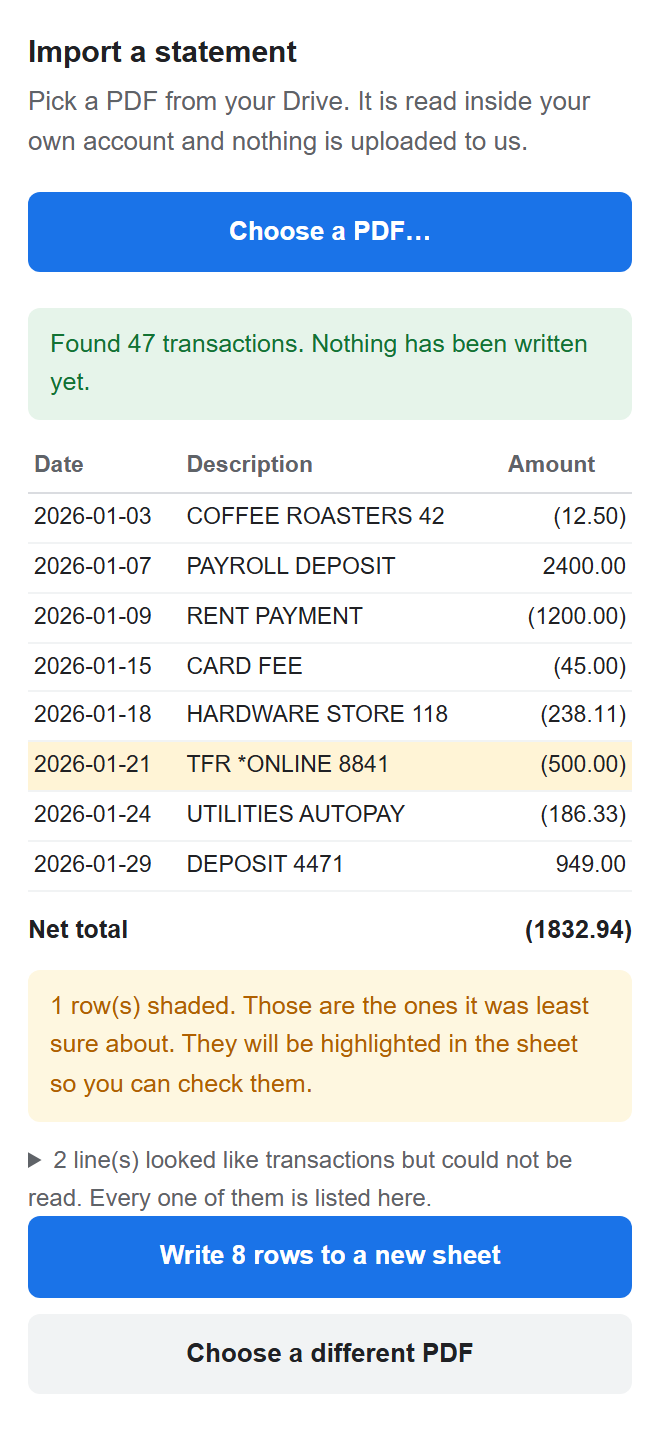
The Statement to Sheets sidebar showing 47 found transactions,
        a net total, one shaded low-confidence row, and a button to write the rows to a new sheet.

The actual sidebar, not a drawing of it.

Nothing happens until you say so

You see every row and what they add up to. Only then does it write, and it writes into a new sheet, never over the one you’re looking at.

It admits what it is unsure about

Rows it is less confident about are shaded, in the preview and in the sheet, so your eye goes to the three that need checking instead of all two hundred. Every line it could not read is listed in full, not counted and hidden.

It checks its own work against your balances

Your statement prints an opening and a closing balance. It adds the rows up and tells you whether they agree. If they don’t, you get the exact shortfall instead of a hunt.

The signs come out right

Parentheses, a trailing DR, a minus sign. Every bank writes debits differently, and getting it wrong inverts your whole month. Where the statement prints a running balance, that decides it, because the balance cannot be misread the way a symbol can.

Where it struggles, before you find out yourself

Every statement layout is somebody’s house style. These are the ones that give it trouble today, said here rather than discovered by you at 9pm:

Statements from outside the US

It reads 05/06/2026 as May 6th. On a day-first statement every date in that range lands on the wrong day, and nothing looks broken. Check the first few rows.

Credit card statements

Cards run the signs the other way round from a bank account. Purchases and payments can come out inverted. Built for bank statements first.

Bad scans

If a scan is poor enough that a line loses both its date and its amount, nothing can tell it apart from ordinary text. That is what the balance check is for.

It is not accounting software

It does not categorise, reconcile against your ledger, or file anything. It reads a statement and gives you rows you can trust enough to work from.

This list will get shorter. It is here because a tool that hides where it is weak is a tool you have to check anyway, which defeats the point of it.

Priced so the decision is easy. Built so it’s the right one.

You’re not buying cheaper data entry. You’re buying numbers you don’t have to re-check.

For what it’s worth, the leading paid add-on runs $99 a year prepaid, or $228 a year billed monthly according to a customer who posted his own invoice, and two of its reviewers wrote the same sentence about it: “Installs but there’s no obvious way to use it.” Being cheaper than that is the least interesting thing about this.

Your first 3 statements are free, with no card. After that:

Best value
$79
a year, unlimited statements
Get it for a year
$12
a month, cancel any time
Go monthly

Your key is emailed within a few minutes. Paste it into the add-on and the limit is gone.